
SVG Illustration Style Guide
Das Illustration-System
Zwei Typen. Vier Bausteine. Alles andere ist Komposition.
Beispiel-Galerie
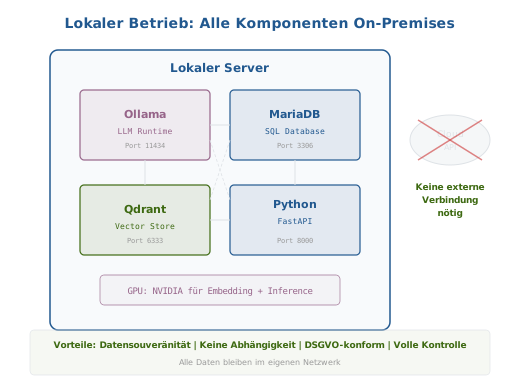
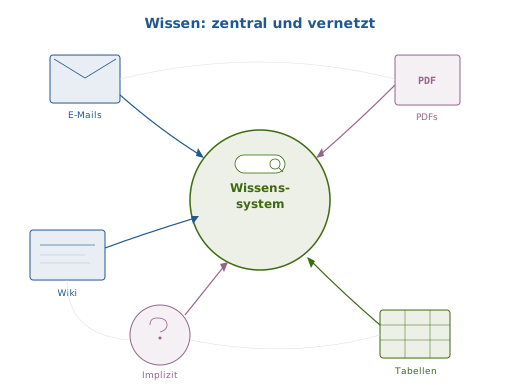
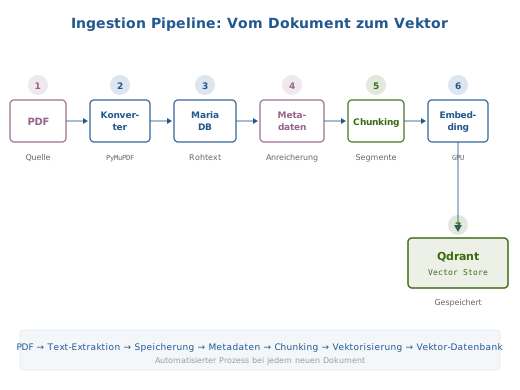
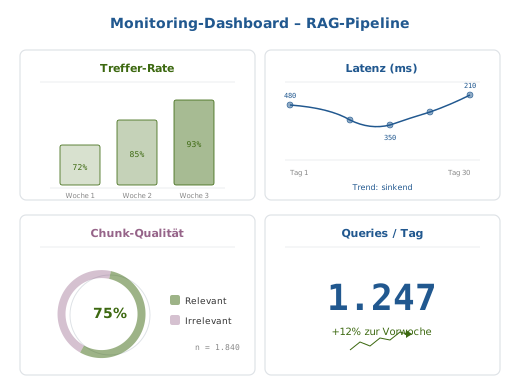
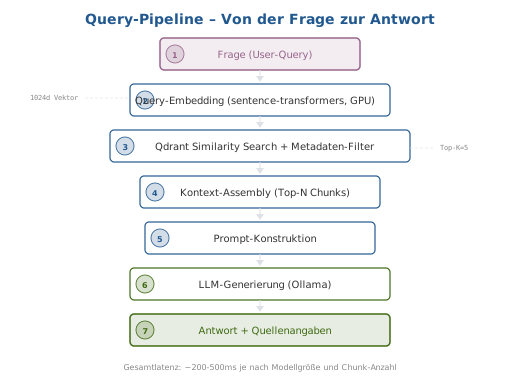
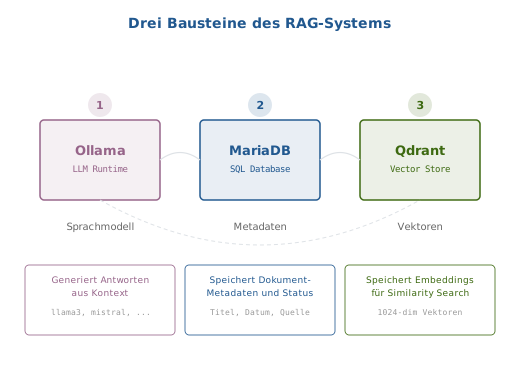
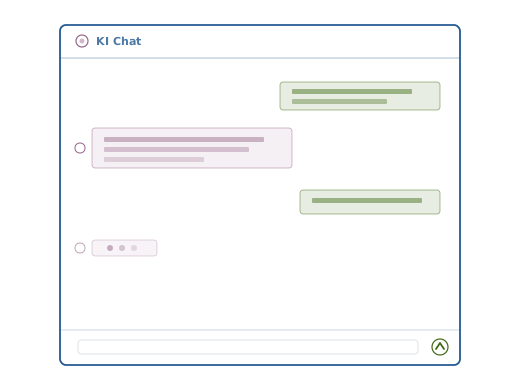
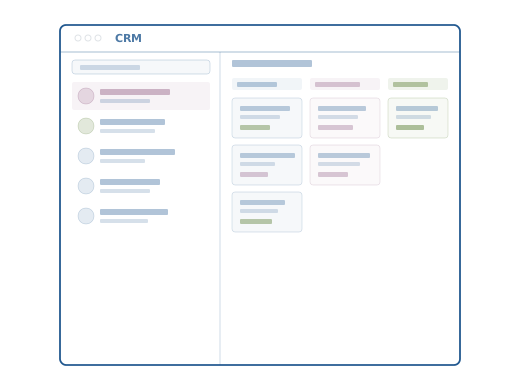
Repraesentative Illustrationen aus allen drei Subtypen. Jede Illustration zeigt wiederkehrende Komponenten, die weiter unten als abstrakte Primitives dokumentiert sind.
Concept
Diagram
Interface
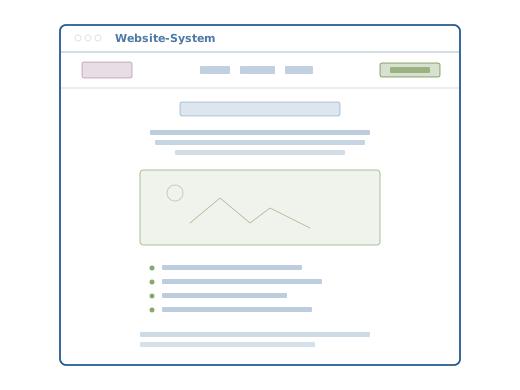
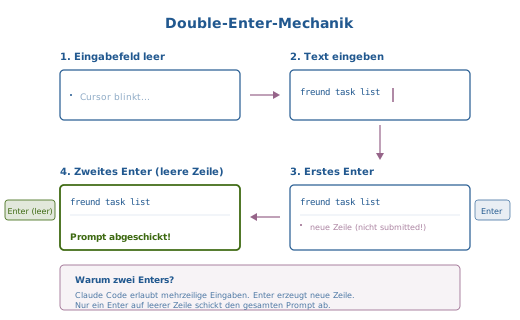
Komponenten-Katalog: 8 Primitives
Aus der Analyse aller 43 Illustrationen ergeben sich 8 wiederkehrende Primitives, aus denen jede Illustration zusammengesetzt ist:
| # | Primitive | Vorkommt in | Subtypen |
|---|---|---|---|
| 1 | Window Chrome | Interface (alle 16) | Browser-Fenster mit Dots + Titel |
| 2 | Box-Card | Concept, Diagram (alle) | Labeled Box mit Titel + Untertitel |
| 3 | Arrow/Connector | Concept, Diagram (alle) | Horizontal, vertikal, radial |
| 4 | Numbered Step | Diagram (Pipeline-Typen) | Kreis mit Nummer + Box darunter |
| 5 | Content-Line | Interface (alle 16) | Placeholder-Rechteck fuer Text |
| 6 | Layer/Section | Diagram, Concept | Hintergrund-Flaeche mit Label |
| 7 | Search Field | Interface, Concept | Rounded Rect + Lupe |
| 8 | Status Indicator | Diagram, Interface | Farbiger Punkt/Badge |
Farbrollen in Primitives
Jedes Primitive nutzt Farben nach semantischer Rolle, nicht nach Ort:
| Rolle | Farbe | Beispiel |
|---|---|---|
| Primaer/Struktur | #21588F |
Window Chrome, Layer, Verbindungen |
| Akzent/Hervorhebung | #966489 |
Aktive Box-Card, Chat-Avatar, API-Layer |
| Positiv/Aktion | #3d6911 |
User-Nachrichten, CTA-Buttons, Erfolg-Status |
| Neutral/Muted | #666666 / #dee2e6 |
Beschriftungen, Trennlinien, Chrome-Dots |
Primitive 1: Window Chrome
Simuliert ein Browser- oder App-Fenster. Verwendet in allen 16 Interface-Illustrationen und in animierten SVGs.
Aufbau
┌─────────────────────────────────────────┐
│ ○ ○ ○  Titel                            │  ← Header (y=25 bis y=52)
├─────────────────────────────────────────┤
│                                         │
│              Content-Area               │  ← Nutzbarer Bereich
│                                         │
└─────────────────────────────────────────┘
SVG-Code
<!-- Window: Outer Frame -->
<rect x="60" y="25" width="400" height="340" rx="6"
      fill="#ffffff" stroke="#21588F" stroke-width="1.8"/>

<!-- Header Line -->
<line x1="60" y1="52" x2="460" y2="52"
      stroke="#21588F" stroke-width="0.8" opacity="0.5"/>

<!-- Browser Dots -->
<circle cx="78" cy="38" r="3" stroke="#dee2e6" stroke-width="1"/>
<circle cx="88" cy="38" r="3" stroke="#dee2e6" stroke-width="1"/>
<circle cx="98" cy="38" r="3" stroke="#dee2e6" stroke-width="1"/>

<!-- Window Title -->
<text x="115" y="42" font-family="sans-serif" font-size="11"
      font-weight="600" fill="#21588F" opacity="0.8">Titel</text>
Feste Werte
| Eigenschaft | Wert | Variabel? |
|---|---|---|
| Position | x=60, y=25 | nein |
| Groesse | 400 × 340 | nein |
| Border-Radius | rx=6 | nein |
| Stroke-Farbe | #21588F | nein |
| Stroke-Breite | 1.8 | nein |
| Header-Linie y | 52 | nein |
| Dots cx | 78, 88, 98 | nein |
| Dots Farbe | #dee2e6 | nein |
| Titel x | 115 | nein |
| Titel-Text | — | ja |
Variante: Mit farbigem Avatar (Chat)
<!-- Statt Browser-Dots: Avatar-Kreis -->
<circle cx="82" cy="41" r="6" stroke="#966489" stroke-width="1.2"/>
<circle cx="82" cy="41" r="2.5" fill="#966489" opacity="0.45" stroke="none"/>
<text x="96" y="45" font-family="sans-serif" font-size="11"
      font-weight="600" fill="#21588F" opacity="0.8">KI Chat</text>
Verwendung
interface-chat, interface-crm, interface-website, interface-email, interface-kalender, interface-wissensdatenbank, interface-webshop, interface-dateisystem, interface-erp, interface-hr, interface-support, interface-analytics, interface-buchhaltung, interface-dms, interface-projektmanagement, interface-zeiterfassung
Primitive 2: Box-Card
Beschriftetes Rechteck fuer eine Entitaet (Dienst, Komponente, Datenquelle). Das haeufigste Primitive — in fast jeder Illustration vorhanden.
Aufbau
┌────────────────┐
│   Titel (600)  │  ← font-weight 600, sans-serif
│  Untertitel    │  ← monospace, kleiner
│   (Port/Info)  │  ← optional, monospace, muted
└────────────────┘
    Beschriftung    ← optional, ausserhalb, #666666
SVG-Code: Standard
<rect x="80" y="90" width="130" height="70" rx="4"
      fill="rgba(150,100,137,0.1)" stroke="#966489" stroke-width="1.2"/>
<text x="145" y="118" font-family="sans-serif" font-size="11"
      font-weight="600" fill="#966489" text-anchor="middle">Ollama</text>
<text x="145" y="134" font-family="monospace" font-size="8"
      fill="#966489" text-anchor="middle">LLM Runtime</text>
Farb-Varianten
| Variante | stroke | fill (rgba) | text fill | Semantik |
|---|---|---|---|---|
| Rosa | #966489 | rgba(150,100,137,0.1) | #966489 | KI, API, Akzent |
| Blau | #21588F | rgba(33,88,143,0.1) | #21588F | Datenbank, Struktur |
| Gruen | #3d6911 | rgba(61,105,17,0.1) | #3d6911 | Vektor, Positiv, Aktion |
Feste Werte
| Eigenschaft | Wert |
|---|---|
| Border-Radius | rx=4 |
| Stroke-Breite | 1.2 (Standard), 1.5 (betont) |
| Fill-Opacity | 0.1 (via rgba) |
| Titel font-size | 11–13 |
| Untertitel font-size | 8–9, monospace |
| text-anchor | middle (zentriert in Box) |
Variable Werte
| Eigenschaft | Bereich |
|---|---|
| Groesse | 60×42 (klein) bis 130×80 (gross) |
| Position | frei |
| Farb-Variante | Rosa / Blau / Gruen |
| Titel-Text | frei |
| Untertitel | optional |
| Externe Beschriftung | optional, y + Hoehe + ~20, #666666, font-size 9–10 |
Beispiele im Bestand
- concept-lokaler-betrieb: 4 Box-Cards (Ollama, MariaDB, Qdrant, Redis)
- diagram-drei-bausteine: 3 Box-Cards nebeneinander
- diagram-ingestion-pipeline: 8 kleine Box-Cards als Stationen
- concept-wissen-zentral: 6 Box-Cards radial um Zentrum
Primitive 3: Arrow / Connector
Verbindungslinien zwischen Elementen. Zwei Hauptvarianten: gerade Linie und Bezier-Kurve. Immer mit Pfeilspitze.
Variante A: Gerade Linie + Polygon
<!-- Horizontal -->
<line x1="250" y1="95" x2="275" y2="95"
      stroke="#966489" stroke-width="1.2"/>
<polygon points="280,95 273,91 273,99" fill="#966489"/>

<!-- Vertikal -->
<line x1="260" y1="119" x2="260" y2="133"
      stroke="#21588F" stroke-width="1.0"/>
<polygon points="260,137 256,131 264,131" fill="#21588F"/>
Variante B: Bezier-Kurve + Polygon
<path d="M 120 180 Q 145 180 160 180"
      fill="none" stroke="#21588F" stroke-width="1.0"/>
<polygon points="167,180 160,176 160,184" fill="#21588F"/>
Variante C: Muted Connector (fuer Schrittfolgen)
<path d="M 260 70 L 260 80"
      fill="none" stroke="#dee2e6" stroke-width="1.0"/>
<polygon points="260,82 256,76 264,76" fill="#dee2e6"/>
Pfeilspitzen-Geometrie
Die Pfeilspitze ist immer ein <polygon> mit 3 Punkten. Laenge: 7px, Breite: 8px.
| Richtung | Polygon-Pattern |
|---|---|
| Rechts → | points="X,Y X-7,Y-4 X-7,Y+4" |
| Links ← | points="X,Y X+7,Y-4 X+7,Y+4" |
| Unten ↓ | points="X,Y X-4,Y-6 X+4,Y-6" |
| Oben ↑ | points="X,Y X-4,Y+6 X+4,Y+6" |
Feste Werte
| Eigenschaft | Wert |
|---|---|
| stroke-width | 0.8–1.2 |
| Pfeilspitzen-Laenge | 7px |
| Pfeilspitzen-Breite | 8px |
| Fill der Spitze | identisch mit Linie |
Farb-Varianten
| Farbe | Verwendung |
|---|---|
| #21588F | Struktur-Verbindungen, Datenfluss |
| #966489 | Akzent-Verbindungen, Hervorhebung |
| #dee2e6 | Muted, Schrittfolgen-Verbinder |
| #3d6911 | Positiv-Fluss, Ergebnis-Pfade |
Primitive 4: Numbered Step
Nummerierter Schritt fuer Pipeline- und Prozess-Diagramme. Kombination aus Nummern-Kreis und darunter liegender Box-Card.
Aufbau
    ②         ← Kreis mit Nummer (oberhalb)
┌────────┐
│ Titel  │    ← Box-Card (darunter)
│ Detail │
└────────┘
  Label       ← Optionale Beschriftung
SVG-Code
<!-- Nummern-Kreis -->
<circle cx="120" cy="85" r="10"
        fill="#21588F" opacity="0.15"/>
<text x="120" y="89" font-family="sans-serif" font-size="9"
      font-weight="600" fill="#21588F" text-anchor="middle">2</text>

<!-- Station-Box -->
<rect x="90" y="100" width="60" height="42" rx="4"
      fill="#ffffff" stroke="#21588F" stroke-width="1.2"/>
<text x="120" y="125" font-family="sans-serif" font-size="9"
      font-weight="600" fill="#21588F" text-anchor="middle">Konverter</text>

<!-- Optionales Label -->
<text x="120" y="160" font-family="monospace" font-size="7"
      fill="#666666" text-anchor="middle">PyMuPDF</text>
Variante: Inline-Nummer (in der Box)
Fuer vertikale Pipelines wie query-pipeline:
<rect x="130" y="84" width="260" height="32" rx="4"
      fill="#ffffff" stroke="#21588F" stroke-width="1.2"/>
<circle cx="145" cy="100" r="9"
        fill="#21588F" fill-opacity="0.2" stroke="#21588F" stroke-width="0.8"/>
<text x="145" y="104" font-family="sans-serif" font-size="8"
      font-weight="600" fill="#21588F" text-anchor="middle">2</text>
<text x="255" y="104" font-family="sans-serif" font-size="10"
      fill="#333" text-anchor="middle">Query-Embedding</text>
Feste Werte
| Eigenschaft | Wert |
|---|---|
| Kreis-Radius | 9–10 |
| Kreis fill-opacity | 0.15–0.2 |
| Nummer font-size | 8–9 |
| Nummer font-weight | 600 |
Verwendung
- diagram-ingestion-pipeline: 8 Steps horizontal, Nummern oberhalb
- diagram-query-pipeline: 6 Steps vertikal, Nummern inline
- diagram-retrieval-pipeline: Steps mit Nummern-Kreisen
Primitive 5: Content-Line
Placeholder-Rechtecke, die Textzeilen simulieren. Verwendet in allen Interface-Illustrationen fuer Nachrichten, Listen, Formulare.
Aufbau
████████████████████   ← Zeile 1 (opacity 0.45, volle Breite)
██████████████         ← Zeile 2 (opacity 0.35, 75% Breite)
██████████             ← Zeile 3 (opacity 0.25, 60% Breite)
SVG-Code
<!-- Dreizeilige Textblock-Simulation -->
<rect x="104" y="137" width="160" height="5" rx="1"
      fill="#966489" opacity="0.45" stroke="none"/>
<rect x="104" y="147" width="145" height="5" rx="1"
      fill="#966489" opacity="0.35" stroke="none"/>
<rect x="104" y="157" width="100" height="5" rx="1"
      fill="#966489" opacity="0.25" stroke="none"/>
Feste Werte
| Eigenschaft | Wert |
|---|---|
| Hoehe | 4–6px |
| Border-Radius | rx=1 |
| Zeilenabstand | 10px (y-Differenz) |
| stroke | none |
Opacity-Staffelung
| Zeile | Opacity | Breite (relativ) |
|---|---|---|
| 1 (oben) | 0.45 | 100% |
| 2 | 0.35 | ~75% |
| 3 | 0.25 | ~60% |
| 4+ | 0.18 | ~45% |
Jede Folgezeile: etwas kuerzer und transparenter → erzeugt "auslaufend"-Effekt.
Farb-Varianten nach Kontext
| Kontext | Fill-Farbe | Beispiel |
|---|---|---|
| KI-Nachricht | #966489 | interface-chat (AI-Bubble) |
| User-Nachricht | #3d6911 | interface-chat (User-Bubble) |
| Allgemein/Neutral | #21588F | interface-website, interface-crm |
| Navigation | #21588F, opacity 0.28 | interface-website (Nav-Items) |
Variante: Ueberschrift + Text
<!-- Ueberschrift (dicker, hoeher) -->
<rect x="180" y="102" width="160" height="14" rx="2"
      fill="#21588F" fill-opacity="0.15"
      stroke="#21588F" stroke-width="0.7" stroke-opacity="0.45"/>

<!-- Text darunter (duenner, kein Stroke) -->
<rect x="155" y="124" width="200" height="5" rx="1"
      fill="#21588F" opacity="0.25" stroke="none"/>
Verwendung
Alle 16 Interface-Illustrationen, concept-double-enter (Eingabefelder)
Kompositions-Patterns
Die 8 Primitives kombinieren sich zu wiederkehrenden Layouts. Hier die 5 haeufigsten Patterns.
Pattern A: Pipeline (horizontal)
①→ ②→ ③→ ④→ ⑤Numbered Steps + Arrows horizontal aneinandergereiht. Jede Station ist eine Box-Card.
- Breite pro Station: 56–80px
- Abstand zwischen Stationen: ~25px (Pfeil)
- Beispiele: ingestion-pipeline, embedding-pipeline-a
Pattern B: Pipeline (vertikal)
┌──────────────────┐
│  ① Schritt 1     │
└──────────────────┘
         ↓
┌────────────────────────┐
│  ② Schritt 2           │
└────────────────────────┘
         ↓
┌────────────────────────────┐
│  ③ Schritt 3               │
└────────────────────────────┘
Steps stapeln sich vertikal, Breite waechst nach unten → "Trichter"-Effekt.
- Beispiele: query-pipeline, retrieval-pipeline
Pattern C: Schichtmodell
┌─────────────────────────────────┐
│  Layer 1: Frontend              │  ← Layer/Section
│  ┌─────┐ ┌─────┐ ┌─────┐      │  ← Box-Cards im Layer
│  └─────┘ └─────┘ └─────┘      │
├─────────────────────────────────┤
│  Layer 2: API                   │
│  ┌───────────────────────┐     │
│  └───────────────────────┘     │
├─────────────────────────────────┤
│  Layer 3: Backend               │
└─────────────────────────────────┘
Geschachtelte Layers mit Box-Cards. Pfeile verbinden Schichten vertikal.
- Layer fill-opacity: 0.03–0.08
- Beispiele: system-architektur, tmux-architektur
Pattern D: Interface-Mockup
┌─────────────────────────────┐
│ ○ ○ ○  Titel                │  ← Window Chrome
├─────────────────────────────┤
│ Sidebar │    Content-Area   │  ← Optionale Sidebar
│ ███████ │ ┌───────────────┐ │
│ ██████  │ │ Content-Lines │ │
│ █████   │ └───────────────┘ │
│         │  [Button]         │
└─────────────────────────────┘
Window Chrome + optionale Sidebar + Content-Area mit Content-Lines.
- Sidebar-Breite: ~35% (Trennlinie bei x=220)
- Beispiele: interface-crm, interface-email, interface-dms
Pattern E: Radiales Netzwerk
        ┌─────┐
        │     │
        └──┬──┘
     ╱     │     ╲
┌─────┐ ┌──┴──┐ ┌─────┐
│     │ │     │ │     │
└─────┘ │  ●  │ └─────┘
        │     │
        └──┬──┘
     ╱     │     ╲
┌─────┐         ┌─────┐
│     │         │     │
└─────┘         └─────┘
Zentrales Element (Kreis) mit radialen Verbindungen zu Box-Cards.
- Zentraler Kreis: r=50–70
- Verbindungslinien: gestrichelt oder durchgehend
- Beispiele: concept-wissen-zentral, concept-wissen-verstreut
Zusammenfassung
| Pattern | Primitives | Typischer Subtyp |
|---|---|---|
| Pipeline horizontal | Steps + Arrows + Box-Cards | Diagram |
| Pipeline vertikal | Steps + Arrows + Box-Cards | Diagram |
| Schichtmodell | Layers + Box-Cards + Arrows | Diagram |
| Interface-Mockup | Window Chrome + Content-Lines + Search | Interface |
| Radiales Netzwerk | Box-Cards + Arrows (radial) | Concept |